Warmup
Disclosed diagnostics, placement evidence, participation and conservative pacing.
Warmup sends short, disclosed test messages between participating mailboxes and records where they land. It reveals configuration and delivery problems, but it does not guarantee inbox placement.
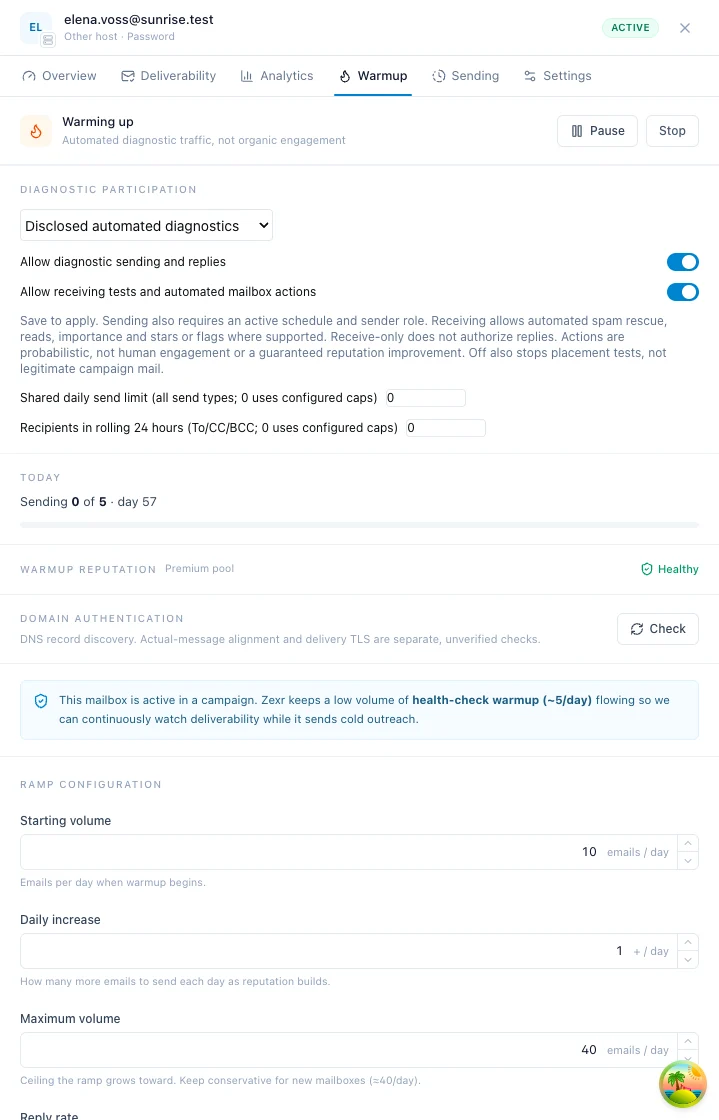
Start warmup on a mailbox
Open a mailbox from the Accounts list and go to the Warmup tab of its drawer.
Start warmup to turn on diagnostic sending.
Choose where warmup mail is filed: Its own folder (the default), Leave it in the inbox, or Archive it.
Pause to stop sending but keep receiving, or Stop to turn off both while keeping the ramp history.
Good to know
- Warmup is a paid feature: free organizations can connect mailboxes, but no warmup traffic is scheduled for them.
- New mailboxes start with warmup off. Once on, it starts at
10emails a day by default and climbs by+1a day to a ceiling of40. - Keep warmup on after campaigns start. A mailbox backing a live campaign drops to at most five warmup messages a day.
- Warmup mail never appears in the unibox, and it is removed from the mailbox after 30 days by default.
- Spam placement is judged at Google, Microsoft and Yahoo only. It slows a mailbox down but does not, on its own, quarantine or block it.
Warmup sends disclosed automated diagnostics between participating mailboxes. It measures observed placement and bounded actual-message DKIM evidence. It does not establish organic engagement or guarantee reputation improvement or inbox placement.
Warmup is a paid feature
Free organizations can connect mailboxes, but no warmup traffic is scheduled for them; pending warmup activity is skipped rather than sent.
Diagnostics reveal configuration and delivery problems, not whether real recipients welcome outreach. Provider acceptance is not inbox placement; synthetic replies are not human feedback. Missing observations remain unknown.
With warmup enabled, Zexr repeatedly picks a partner mailbox (avoiding recent ones), decides whether to start a thread or reply to one, sends a short plaintext message through that mailbox's worker, then records stats and schedules the next send.
Diagnostics carry task/sender/recipient-bound application tokens and disclose automation and hypothetical scenarios. They use configured mailbox identities and no open/click pixels.
Providers may strip headers or replace identifiers. Exact authorized lineage and send-result identifiers correlate diagnostics; missing or ambiguous lineage stays closed. Tokens identify application-owned traffic, not cryptographic authentication.
When an SMTP relay rewrites a Message-ID, a valid recipient-bound verification token, the expected sender address and a confirmed send can authorize one received copy. Replies and message-specific DKIM verification use that copy's received identifier. Headerless arrivals still require an exact confirmed identifier for new diagnostic lineage; a matching subject or mailbox pair alone does not authorize a reply. Arrivals held before send confirmation or during a verification outage are retained and retried automatically while their token remains valid.
New mailboxes default off. Independent send/receive controls and shared daily/rolling limits are on the Warmup tab. Start/resume enables disclosed automated sending and, when starting from Off or legacy, receiving with provider-supported spam rescue, reads, importance and stars or flags. Pause preserves separately authorized receiving, and Stop disables both while retaining ramp history and holds. Recipient-only cannot reply. Sender-only does not authorize recipient engagement.
When a send fails
The Warmup tab shows provider failures from the last 24 hours with their reported time when no later warmup send has been confirmed. The message expires even on an already-open page without another send. A lack of confirmed delivery is not proof that the mailbox is still failing. Provider and sign-in errors appear immediately; worker-loading hiccups do not.
A worker-loading warning appears only for an active, sending-enabled mailbox after repeated loading failures span at least an hour and the latest failure is less than an hour old. It expires when that evidence becomes stale, including on an already-open page, and is hidden when participation is paused or stopped. One historical failed attempt is never displayed indefinitely as an active loading problem. A later provider-confirmed warmup send clears it; synchronization or a dispatched task alone does not prove delivery.
"The sending worker has not loaded this mailbox yet" means that attempt did not send. It is not proof of a deliverability hold, a refused sign-in or an IP allowlist problem. Active mailboxes are reloaded automatically; after a worker restarts, it keeps reporting its restart until the backend acknowledges the request to reload its mailboxes.
Persistent loading failures and pending warmup tasks at least an hour past their intended schedule are checked every five minutes and reported to configured operator channels and error tracking. The latter is a dispatch problem, not evidence of rejected credentials. The local dispatcher persists a five-minute retry delay after internal failures so an old failing batch cannot indefinitely block newer tasks. Backoff does not alter the intended send time, clear a safety hold, or bypass provider limits.
A missing mailbox also requests another reload through the worker heartbeat. Existing warmup sends stuck before execution recover automatically: after ten minutes, the scheduler retires a nonce-protected command only when neither worker execution nor a delivery receipt exists, refunds its reserved count, and resumes the mailbox's normal schedule. Delayed copies of the retired command cannot send. Customers do not need to disconnect or re-add their mailboxes. Actually started sends with missing outcomes, conflicting outcomes, provider cooldowns, authentication failures and other safety holds are not cleared by this repair.
Recovery runs at backend startup and every minute in bounded batches. The ten-minute cutoff is unchanged: it protects recent authorizations, not a waiting period added after each release. Existing older commands can be retired on the first pass; large fleets can need subsequent passes to reseed every schedule. Sending hours, quotas and actual provider failures still apply.
Kafka workers process independent mailbox lanes concurrently instead of making the whole worker wait for one command. Older queued commands are grouped by their mailbox payload too. The broker checkpoint never passes unfinished or failed work, and failed subscriptions reopen for replay.
Unacknowledged warmup filing actions remain durable. They retry every five minutes initially, then every fifteen minutes after twenty minutes of pending time, capped at every thirty minutes after an hour. Repeated arrivals do not reset that age. This reduces repeat commands during a worker backlog without discarding pending filing or counting it as a failed send.
If outbound admission refuses a warmup command before publication, a successful deferral returns it to the schedule without recording a failed send. A deferral whose database outcome is uncertain is not treated as proof of failure. Existing records affected by an older preparation-result race also recover automatically, but only when the recorded internal preparation failure predates the new authorization and there is no execution, outbound reservation, provider-confirmed send or receipt. Only that provably unstarted command's false conflict is released; genuine conflicting outcomes remain held.
Follow a provider-specific error when one is shown. Google and Microsoft sign-ins use their native APIs, not SMTP settings. Reconnect those mailboxes only for a reported sign-in or permission error. SMTP host, port, password and IP allowlist checks apply to SMTP mailboxes when the error reports a mail-server connection problem. Zexr makes those connections from its own network.
Recovery does not bypass paused participation, provider limits or deliverability holds. If the warning persists, give support the mailbox address and the failure time so it can be matched to the worker's loading and sending records.
Where the content comes from
Message generation stays off the live sending path. When an AI provider is configured, a background batch builds complete conversation plans (a subject, an opening, and five alternating reply turns), each validated against a strict schema, checked for robotic language, and passed through a safety lint before entering the active bank. When the operator has also configured TypeSafe (TYPESAFE_API_KEY), each thread is judged for pitches and generated-sounding filler before entering the bank, and the thread text is sent to TypeSafe for that.
Canonical turns use actual alternating configured identities and pinned subject/source/version. Exact-parent continuation preserves facts and closes exhausted, retired or missing threads. A varied vetted bank of disclosed hypothetical exercises supplies fallback. Generated prose never claims a provider check passed.
The controller runs every six hours against the last seven days of demand: at least 200 active threads, up to 5,000, refreshing the most-used content, at most 250 threads per batch and 1,000 per day. Threads are retired automatically when at least 3 of 20 or more sampled deliveries land in spam and the rate is 15% or higher. Admins monitor it but never refill it by hand.
A pool is the set of mailboxes that warm each other. Your mailbox exchanges warmup mail within its own pool, with the mirrored crossings documented below.
| Pool | Who is in it |
|---|---|
premium | Paid organizations' mailboxes. The default for paid accounts, isolated from lower-trust traffic. |
free | Lower-trust or trial mailboxes, kept separate so free traffic does not mix into premium reputation. |
A mailbox belongs to exactly one pool at a time. When its plan changes the mailbox moves between pools rather than joining a second one, and it takes its warmup standing with it, so a quarantine or block is not cleared by changing tier.
Premium access is to the safe partner set, not just to receivers with paid subscriptions. Its eligible recipients include free-tier mailboxes that have been pool members for at least three days, are healthy now, and belong to another workspace in good standing. These partners are available even when the premium tier is large. Both tiers are weighted by coverage, observed placement and exchange balance, without a paid-receiver-first preference. Every borrowed mailbox is checked against its own pool's standing before use. Mailboxes remain members of their original pool; this is a permitted exchange, not a pool merge.
The borrow is returned: a free-tier mailbox that meets the same bar (healthy now, a member for at least three days, in a workspace in good standing) may write to a paying mailbox that wrote to it in the last 14 days, and to no other paying mailbox. A visit is returned alongside the mailbox's own tier rather than after it, so a paying inbox is written back to even when the free tier is large. Nothing unsolicited from the free tier reaches a paying inbox: the paying side always opens the exchange, and a free mailbox on watch keeps warming in its own tier but stops calling on paying ones.
Every draw also favours the inbox that is owed the most. A mailbox that has sent to many partners and heard back from few is drawn up to four times as often as one in balance, and the preference fades as the pool pays it back, so traffic settles near parity instead of overshooting. The other way is bounded too: an inbox receives at most about twice what it sends in a day (never fewer than 10, never more than 60), and once it reaches that it is left out of every draw for the rest of the day. Free-tier senders stop at three quarters of that, so the rest of every inbox's day is kept for premium mailboxes. A mailbox with nobody left to write to sends nothing and tries again later rather than mailing the same partner twice.
Partner/domain diversity broadens diagnostic coverage. It is not identity rotation to evade quotas or evidence of reputation efficacy.
A placement seed inbox never joins a pool: marking a mailbox as a seed turns its warmup off, and starting warmup on a seed is refused, because a seed that exchanged mail with the pool would stop being a stranger to every sender in it. It never sends campaign mail either.
Choosing partners
Outside-workspace partners broaden observations. Diversity does not turn automated traffic into organic engagement.
Within that order, partners are picked by weight rather than at random. Three things move the weight:
- Host and domain coverage. Eligible mail hosts start with balanced total weight, so a host with many custom domains does not crowd out a consumer host sharing one domain, such as Gmail. Recently used domains are downweighted within each host; partner no-repeat rules and daily receiving caps still apply. Gmail and Google Workspace are distinct hosts, as are Outlook.com and Microsoft 365.
- Where you are landing. Zexr tracks your spam-placement rate separately for each recipient mail host over the last seven days: who actually runs that recipient's mail (Google Workspace, Microsoft 365, Zoho Mail, Hostinger and so on), read from the partner's mail servers rather than its address, so two custom domains on different hosts are judged apart. A mailbox landing in spam at one host but not the others is sent fewer partners on that host until the rate falls, without waiting for an overall health band to trip.
- Your routing rules, when you have configured any. A rule's weight multiplies a partner's chance; a weight of
0is not a weight but an exclusion, so that pairing never happens.
Balanced starting weights are not a fixed sending ratio. Available recipients, health, daily caps, recent pairings, placement feedback and routing rules still determine the actual split. More traffic to a host does not establish improved inbox placement.
An exclusion is honoured even when it leaves nothing: if every available partner is excluded by your rules, the mailbox sends no warmup mail that tick and tries again later, rather than mailing someone you ruled out because the pool had nobody else. The same holds when a partner writes first: your mailbox does not reply to an address your rules exclude. Rules apply to paid-tier mailboxes.
A struggling host is downweighted, never excluded: a sender that stops mailing a host entirely can never discover that it recovered there. A host is only judged once at least five of your warmup emails have verifiably arrived there in the window, so one bad delivery out of two is treated as noise rather than a pattern. You can see the numbers this reads under Deliverability > Warmup inbox placement, by expanding a provider to its hosts.
Mailboxes the pool cannot reach
A warmup email only counts once the recipient's own sync finds it. Every partner is also weighted by how much of the pool's warmup mail to it arrived over the last seven days, so a partner whose mail half arrives is drawn about half as often.
A partner that received at least 5 warmup emails from at least 2 different workspaces in that week, and verifiably received none of them, is not offered to anyone. That is a mailbox whose domain has no working mail server, an address that no longer exists, or a server that refuses the mail, and every send to it would only come back to you as a bounce. Emails sent in the last 6 hours are not counted yet, so a slow sync is never mistaken for a dead inbox, and losses from a single workspace never take a partner out, so one sender's problem is not blamed on the recipient.
Nothing is permanent about it. One warmup email that arrives brings the mailbox straight back, and as the week's evidence ages out it is offered again on its own. If it is your mailbox, the Advisor says so and what to check, starting with the domain's MX records.
Seeing the diversity you are getting
The drawer shows confirmed partners/domains/workspaces and verified arrivals over seven days, locally or through Cloud. Pending and failed attempts do not count as confirmed sending. Narrow coverage is a diagnostic limitation, not a reputation verdict.
The Analytics tab of the same drawer charts the exchange over time: sent, received and replies per day, with the total received against the total sent for the range. The same numbers are in the warmup analytics endpoint.
Pause preserves separate receiving permission; Stop disables both directions. Lost authority, disconnection, quarantine or block also restrict participation. Health alone is not consent.
Every warmup email a mailbox sends is looked for in the partner's mailbox, and when it arrives Zexr records where: the primary inbox, a Gmail category tab (Promotions, Updates, Social or Forums), or spam. Nothing is estimated or sampled, and the history is kept for the life of the mailbox rather than only the latest day.
| Where | What it shows |
|---|---|
| Inbox column in the Accounts list | The mailbox's inbox rate over the last seven days, coloured by band. Click it to open the breakdown |
| Deliverability tab in the mailbox drawer | The same rate with its counts, then day-by-day inbox, tabs and spam, the rate over time, and the split per recipient provider, for 7d to 90d |
| Deliverability > Warmup inbox placement | The workspace total over time and per provider, and every mailbox ranked worst first |
The inbox rate is inbox plus category tabs over everything delivered in the last seven days: mail in Promotions was delivered and not filtered, which is what the number is asked to say. The tabs are still counted separately so you can see them.
| Inbox rate | Band |
|---|---|
90% or more | Healthy |
80% to 90% | Watch |
Below 80% | Landing in spam |
The rate is taken at Google, Microsoft and Yahoo only, the providers that judge a mailbox. Smaller mail hosts run their own filters, so their spam folders never count toward it: a mailbox whose warmup mail only reached small hosts shows no rate rather than one built from them. Other mail hosts are still shown: their inbox rate sits right under the headline in the drawer and on Deliverability, and they appear in the daily charts, the counts and the per-provider breakdown. It only appears once 20 deliveries at those three are in the window, the same sample the pool needs before it acts on spam placement. Until then the mailbox shows how far along it is (8/20) rather than a percentage that would swing on every delivery. The mailbox's health score is capped at its inbox rate, so a mailbox with some mail in spam reads 97, not a flat 100.
Filter by provider to distinguish observations from gaps. Historical rescued counts are requests, not confirmed moves or benefits. Receiving-authorized warmup can request spam rescue, but placement remains the originally observed folder, not a rewritten success after a move. Unconfirmed means not observed after timeout, not verified failure. First-folder evidence is separate from housekeeping; absent historical folders stay unknown. Days are UTC. See warmup placement.
| Setting | Default | Meaning |
|---|---|---|
| Start volume | 10/day | Warmup emails on day one |
| Daily increase | +1/day | How much the target grows daily |
| Ceiling | 40/day | Where the ramp stops climbing |
Configured diagnostic targets start at 10/day and rise by one toward 40/day before other constraints. These are product pacing defaults, not universal safe volumes or readiness evidence.
Four things shape the real daily number: sends are spread across your warmup hours with jitter, the target is capped by how many eligible partners exist, a mailbox whose health drops gets reduced volume and wider spacing until it recovers, and a recent spam placement holds the ramp where it is.
The partner cap exists because a mailbox never writes to the same partner twice in a day. When it applies, the Warmup tab of the mailbox drawer says so: it shows the ramp's number next to how many partners are available to the mailbox today, and the target it reports is the lower of the two. The count can fall during the day as partners reach their daily limit, and it recovers the next day. The same tab names the pool the mailbox warms in.
Warmup hours are read in the mailbox's timezone: its own when one is set on the Settings tab of its drawer, otherwise the workspace timezone under Settings > Profile > Timezones, and UTC when neither is set. Set the workspace timezone once and every mailbox that follows it reads its warmup hours in the team's day. A mailbox with its own timezone keeps it, and changing the workspace timezone does not change any mailbox's hours.
Warmup hours must end later than they start on the same day. Equal or reversed hours are rejected, including a change to only one endpoint that would invalidate the stored window. Existing invalid windows are not widened or corrected automatically: pending sends stay unstarted and recheck after five minutes, while admin monitoring shows Invalid warmup sending hours until the configured window is corrected. Other send protections still apply after correction; this does not replay uncertain sends or confirm mailbox recovery.
Holding the ramp on an early signal
If any warmup email lands in the spam folder of a Google, Microsoft or Yahoo recipient, that mailbox stops climbing immediately:
- today's target is cut by about a quarter, for 48 hours
- the daily increase pauses for three days
- the paused days are subtracted rather than made up, so the ramp does not jump three steps in one morning when it resumes
Another placement during a pause extends it and does not lift the ramp: repeated spam placement can only ever slow a mailbox down.
A landing at any other mail host never holds the ramp. Those hosts each run their own filter, so their spam folder says more about the server than about your mailbox; see how spam placement is judged.
Nothing needs to be switched on and no health band has to trip first. That matters because the bands need a sample before they can judge a mailbox at all (twenty verified warmup deliveries in seven days, a hundred delivered in thirty), which a mailbox in its first fortnight has not reached. Without this, the mailbox landing in spam on day three would keep adding an email a day until it had sent enough to be judged.
Placement slowdown and ramp pause have different windows. The drawer shows observed targets/holds. Lifecycle actions retain ramp history and restrictive holds rather than erasing negative evidence.
Warmup and campaigns coexist
Keep warmup on after campaigns start. A mailbox backing a live campaign drops to at most five warmup messages per day, leaving the campaign as primary traffic. Warmup does not make repetitive or unwanted copy safe: you still need real targeting, personalization, suppression, and unsubscribe support.
Configured diagnostic turns continue disclosed scenarios, not organic relationships. Exact pinned plans and subjects are reloaded, each parent is answered once, and exhausted, retired or missing threads close.
Replies thread properly with a real Re: subject and In-Reply-To header, and candidates must be between 45 minutes and seven days old, so nothing is answered instantly or revived indefinitely.
Receiving warmup mail can also prompt an answer directly. When a verified warmup email arrives, the recipient sometimes points its next scheduled send back at whoever wrote, 25 minutes to 5 hours later and inside its own warmup hours. That is a re-pointing, not extra work: each mailbox has one warmup send queued at a time, so a reply-back moves that send earlier and aims it, and can never push a send the mailbox had already planned sooner. The chance is the recipient's own reply rate, drawn once when the reply is scheduled rather than again when it sends, and it stops before a thread reaches its message cap so replies cannot answer replies indefinitely. A reply crosses the free and paid tiers like the mail it answers: a paid mailbox answers a free partner that wrote to it, and a free mailbox answers a paid one while it is healthy and its workspace is in good standing.
Scheduling respects windows, provider feedback, shared limits and spacing. Jitter distributes load, not human identities. Receiving participation allows probabilistic spam rescue, reads, importance and stars or flags on verified warmup messages. Filing and selected spam rescues are requested immediately; reads, importance and stars are durably scheduled after a randomized dwell. Current receiving permission and worker assignment are checked again at execution time. These actions are automation, not human feedback or a guaranteed reputation improvement.
Warmup is real mail in a real mailbox, so there are two separate places it could show up: the Zexr unibox, and your own mail client. Both are handled, and they are handled differently.
In your mail client
Warmup mail is filed out of the way in the mailbox itself, in both directions: the messages this mailbox received, and the copy of every warmup message it sent. That second half matters more than it sounds, because a mailbox warming at forty a day would otherwise bury a week of real sent mail under machine traffic.
The filing is per mailbox, on the Warmup tab of its drawer:
| Setting | What your mail client shows |
|---|---|
| Its own folder (default) | One folder, Zexr unless you rename it, holding every warmup message in and out. Nothing warmup-related in Inbox or Sent. |
| Leave it in the inbox | Warmup stays where the provider placed it unless selected for spam rescue into Inbox. |
| Archive it | Out of the inbox with no folder of its own: findable by search, listed in All Mail on Gmail. |
The folder is created the first time it is needed, and it is also the answer to "what is this message?": nothing but warmup is filed there, so the folder itself is what identifies warmup traffic in a mail client. If another tool already made a folder you use for this, name that one instead and warmup joins it rather than adding a second.
Spam rescue is provider-specific: Gmail removes Spam and supports Important and Starred labels; Microsoft moves verified Junk messages to Inbox and supports high importance and a follow-up flag; IMAP moves messages out of recognized Spam/Junk folders and uses flags plus best-effort not-junk keywords. IMAP does not have a universal Gmail-style Important label, and SMTP-only mailboxes cannot perform recipient-side actions without mailbox access. A move is not proof that a provider learned a positive reputation signal. Filing remains housekeeping, not engagement evidence. Historical NULL/legacy retains existing behavior until explicit action. Upgrade the consumer, backend and workers together; previously skipped engagement is not replayed onto old mail.
Mail that arrives somewhere unexpected is still handled. A server-side rule, or another warmup tool's filter, can put warmup mail in a folder of its own choosing before Zexr sees it; the message is found there and filed from there, and one already sitting in the destination is left alone rather than moved onto itself.
Filing happens as each message arrives, so changing the setting applies to warmup from that point on.
If filing fails, it is not reported as completed. An updated worker can release that filing command for later retry only after the backend confirms that the exact filing is still in its durable recovery queue. Recovery retries use the current worker assignment and folder setting, spaced by 5, 15 or 30 minutes as the queued filing ages. Unknown recovery authority keeps the existing command retry behavior. This does not resend mail, clear uncertain-send protection, acknowledge mailbox arrivals, or discard retention deletes and removal checks.
A sweep identifies missed application-owned diagnostics and applies authorized housekeeping. It does not establish retroactive authentication or engagement. Leaving mail in the inbox remains an owner choice.
The sweep repairs what it can still see, so it does not clear a backlog that built up before the setting existed. To do that on Gmail, search label:Zexr and archive the results: warmup mail has always carried the label, so that selects exactly it. On Outlook and IMAP the received mail is already in the folder, and only the Sent copies from before this change stay in Sent.
Retention
Authorized retention deletes old diagnostic mail after its window, 30 days by default. Gmail moves it to Trash; Outlook, Microsoft 365 and IMAP delete it. Stored copies follow retention policy. Recipient deletion is not tampering or proof of failure.
Set warmup_retention_days on the Warmup tab or API. Empty follows the default; the minimum is three days.
At the volumes warmup runs, a few plaintext messages of a couple of kilobytes each, a mailbox in balance takes years to fill even on a small hosting quota, so the retention is there so that you never have to think about it rather than because the folder is about to overflow. You do not need to clear the folder by hand, and if you do, see pool safety for what counts.
Gmail and the Sent copy
Gmail exposes folders as labels and does not document whether SENT may be removed. Zexr asks once per mailbox: where Gmail allows it, the sent copy leaves Sent entirely; where it refuses, the copy keeps its place in Sent and carries the warmup label, and nothing asks again. Outlook, Microsoft 365 and IMAP mailboxes move the copy out of Sent normally. SMTP mailboxes never get one in the first place, because Zexr does not file a Sent copy for warmup.
In the unibox
Mailbox-sync recovery replays stored arrivals, not sends. Recognized warmup remains hidden, and replay does not create another warmup send or count sync progress as proof that a provider sent mail. Receipt verification and duplicate-send protections remain separate from the mailbox's live-sync status. See mailbox sync recovery and its limits.
Warmup never appears in the unified inbox, in either direction. Zexr recognizes it by its token, including for recipient-only mailboxes. A consumed or expired token still identifies warmup for filtering, but cannot trigger engagement again. When the header is missing, a recorded message identifier can identify older warmup during history sync; the sender-and-subject fallback stays limited to recent inbound sends so an ordinary conversation is not hidden just because it shares a subject. Existing verified warmup entries are removed from the unibox automatically in background batches, without deleting mail at the provider or changing warmup standing.
Manual replies to verified diagnostic parents can stay hidden from the unibox and follow housekeeping. They do not authorize another automated turn or count as real campaign replies.
If a provider syncs a headerless Sent copy before reporting its final message identifier, Zexr holds a possible match for verification. The send confirmation then identifies which message was warmup, and ordinary mail sharing its subject can enter the unibox. A matching subject alone never permanently hides a sent message.
Bounce notices and spam reports about warmup are held back too. A warmup send that hard-bounces produces an ordinary "Undelivered Mail Returned to Sender" from the receiving server, which carries no warmup token of its own; it names a pool partner nobody chose to write to, so it is recognized by the send it is about and kept out of the unibox. The same reasoning keeps it out of your deliverability record: a warmup bounce never suppresses an address in your suppression list and never counts toward the bounce rate your campaigns are judged on. Warmup bounce rate is a band in pool safety instead. A bounce or complaint about a campaign send is unaffected and still appears, because that is real outreach reaching a real recipient.
Nowhere else either
Warmup writes to none of the tables the customer-facing views read, so nothing needs to filter it out after the fact:
- a contact's Activity timeline is built from campaign progress, opens, clicks, replies, notes, meetings and page hits, and warmup creates no contact and no campaign progress
- a contact's sent-mail list is keyed on campaign tasks, which a warmup send never has
- direct-mail analytics counts a mailbox's own sent and received mail and excludes every task-backed message, campaign and warmup alike
- notifications are raised for domain authentication, worker downtime and campaign guardrails, never per message
Pools enforce permission and restrictive complaint/bounce/authentication evidence, current authority and durable holds. Deleting diagnostics or choosing spam is recipient withdrawal, not automatic tampering misconduct.
| State | Meaning | Effect |
|---|---|---|
healthy | Normal | Full volume |
watch | Mild concern | Spacing stretched modestly |
throttled | Probation | Volume cut, spacing widened until recovery |
quarantined | Clear problem | Out of the shared pool for a cooldown |
blocked | Serious or repeated abuse | Out for longer, review required |
The thresholds for each signal are in the health bands table.
Watch and throttled standing are warnings, not connection failures. They do not subtract a fixed number of points from mailbox health: the score is still capped by the measured inbox rate, and separate account errors can lower it further. The score is overall health out of 100, not another inbox percentage.
How spam placement is judged
Spam placement is a folder outcome, not misconduct or evidence of diagnostic reputation benefit. It slows sending but does not alone quarantine or block a recipient:
10%puts the mailbox on watch: warmup and cold sending are spaced out a little more.20%throttles it: warmup keeps running at half volume with double spacing, and cold volume is halved.- A throttle steps down to watch below
15%, then returns to healthy below7.5%, on its own. They lift below the line that set them rather than at it, so a mailbox sitting near a line is not flipped in and out of a band (and announced to your integrations) with every delivery. The separate early-signal ramp pause still applies to fresh spam landings.
Placement uses today and the preceding six UTC dates, matching the seven-day inbox rate on Deliverability and Emails. Older placement results stop affecting volume at the same boundary as the displayed rate. Complaints and mailbox tampering keep their separate rolling windows.
Only Google, Microsoft and Yahoo recipients judge a mailbox. They filter on sender reputation, which is what your cold email is judged on at those same providers. Every other mail host runs its own filter, often a stock rule set tuned for that one server, so a message landing in its spam folder is not evidence that the mail is spam. Those landings are shown in the placement view and never held against the mailbox, in the bands, the ramp or the Advisor. The rate is taken over verified deliveries at the three providers in the last seven days, and needs 20 of them before it acts.
So a mailbox that inboxes everything at Google and Microsoft stays healthy however many small hosts junk its mail. The reason in the mailbox drawer says what was judged: for example 25% of warmup mail delivered at Google, Microsoft and Yahoo landed in spam over 7 days (40 delivered). Other mail hosts (50% of 20) run their own filters and are not counted.
Selection uses observed coverage to reduce uninformative pairings. Measurement allocation does not prove traffic to a host builds reputation.
Quarantined and blocked mailboxes are selected as neither sender nor recipient. Mail arriving in a mailbox is never held against it: every warmup message carries a single-use token bound to its recipient, so a token cannot be replayed or redirected, and one that lands where it does not belong is simply filed as ordinary mail.
Withdrawal creates no unconditional deletion/spam tampering strike. Owner-attributed spam can still create sender complaint evidence and suppression; provider-attributed moves remain placement evidence. Ambiguity charges nobody. Historical evidence is rechecked without resetting unrelated restrictive holds; failed searches stay unknown.
Acting early protects everyone
Complaint, bounce and authentication evidence may hold sending. Placement slows pacing. Diagnostic age and automated engagement do not establish recovery.
Getting back in requires requalifying, not just waiting: healthy authentication, no recent complaints or hard-bounce spikes, and spam placement back to a low level. Return is gradual, not a jump back to the old ceiling.
A quarantine or a block also holds for its full term. The signals behind it age out of their windows long before it ends, and that does not release it early; a more serious finding can still replace it. A throttle is different and lifts as soon as the mailbox recovers, as the table says. When support lifts a pause or block, or approves an appeal against one, the strikes behind it are cleared with it, so the next evaluation does not reimpose it.
The standing follows the address, not the connection. Removing a mailbox from the workspace and adding it back, or dropping out of the pool and rejoining, does not clear its score or its block: the same address in the same workspace rejoins with the standing it left with. That standing is kept for 90 days after the block ends or after the mailbox was removed, whichever is later; a block that requires review never lapses. A mailbox in good standing leaves nothing behind.
Diagnostic-history mailboxes start cold sending at a conservative ceiling of five/day. Synthetic age never increases it. Recent confirmed human replies to actual campaign recipients permit bounded increases, subject to calendar days and negative feedback. Missing evidence leaves readiness/full-cap dates unknown. This product policy is not a provider-approved safe volume. See campaign pacing.
- Start new mailboxes around
10/day and let the ramp climb slowly. - Do not raise the ceiling above
40casually. - Keep warmup running alongside campaigns, not only before them.
- Prefer more healthy mailboxes over pushing a few too hard.
- Watch complaints and spam placement, not open-rate vanity metrics.