Sending domains
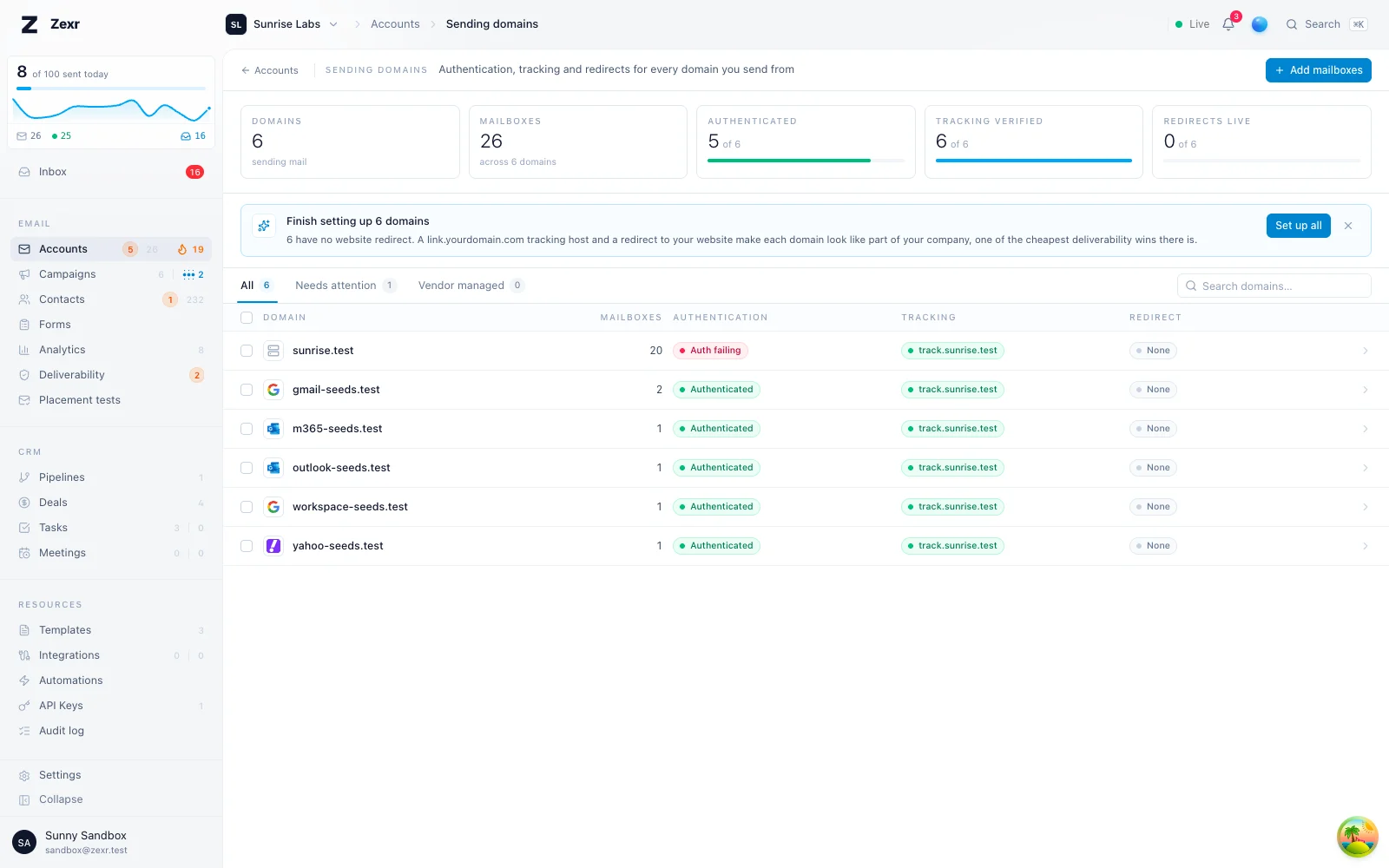
Every domain your mailboxes send from, with its authentication, tracking host and a redirect for visitors to the bare domain.
A sending domain is any domain one of your mailboxes has an address on. Zexr lists them for you, and from here you give each one a tracking host and a redirect for visitors to the bare domain.
Set up your domains
Tick the domains in the list, or the box in the header for every domain shown.
In the bar at the bottom, choose Tracking domain or Redirect.
Set the tracking subdomain (link unless you change it) and the website to send visitors to.
Add the DNS records the dialog lists at your DNS provider, unless an inbox vendor sets them up for you.
Good to know
- There is nothing to add: connect a mailbox on
acme.ioandacme.ioappears here. - A tracking host is saved before its DNS record exists. Links keep using the shared tracking host until the record resolves.
- A redirect sends visitors to the bare domain on to your company's website, so the domain looks like part of a real business.
- Mail is unaffected:
MX, SPF, DKIM and DMARC records live beside these and nothing here changes them. - When an inbox vendor holds the domain, Zexr can forward it or write the tracking record there for you.
Browsing filters, searches and view choices are remembered in your browser tab across refreshes and navigation, separately for each user and workspace.
A sending domain is any domain one of the workspace's mailboxes has an address on. Zexr builds the list from the mailboxes themselves, so there is nothing to add: connect a mailbox on acme.io and acme.io is here.
The same choices are offered per domain while importing mailboxes, so a new domain can be set up in one pass.
Each domain shows:
| Column | What it holds |
|---|---|
| Mailboxes | How many of the workspace's mailboxes are on the domain, and who hosts their mail |
| Authentication | Whether SPF, DKIM and DMARC are published, and the domain's overall state. See domain authentication |
| Tracking hosts | The custom tracking domains the domain's mailboxes use, how many mailboxes use each, and whether each is verified |
| Redirect | Where visitors to the bare domain are sent, and whether the redirect is live |
| Vendor | The inbox vendor account that holds the domain, when one of the workspace's connected vendor accounts does, with its current forwarding and what its API can do for the domain |
A tracking host is normally set per mailbox. From the domain you can set one for every mailbox on it in one step, or clear it for all of them.
Zexr suggests a host: one a verified mailbox on the domain already uses, else one whose DNS already points at this instance (it tries link, links, track, t, click, go, email and trk), else link.<domain>. The suggestion comes with the CNAME value to add. link is the default because it reads as an ordinary link when a recipient hovers one.
The host is saved even before its DNS record exists. Until the record resolves, links keep using the shared tracking host, so nothing breaks; the hourly tracking check verifies the host by itself, and new sends switch to it from then on. Setting the same host again changes nothing.
When an inbox vendor account holds the domain and can write DNS records for it, Zexr can add the CNAME for you instead; see domains held by an inbox vendor.
Tick domains in the list (or the box in the header for every domain shown; hold Shift to tick every row between two clicks) and a bar appears at the bottom:
| Action | What it does |
|---|---|
| Tracking domain | Opens the setup dialog below with the tracking domain on |
| Redirect | Opens the setup dialog below with the redirect on |
| More > Check DNS now | Re-checks every tracking host and redirect still waiting for DNS, instead of waiting for the next automatic check |
| More > Copy DNS records to add | Copies every record the picked domains still need, one per line with the domain, type, name and value, ready to paste into a sheet or a DNS provider's bulk import |
| More > Export as CSV | Downloads the picked domains with their mailboxes, authentication, tracking host, redirect and vendor |
| More > Clear tracking domain | After a confirmation, puts every mailbox on the picked domains back on the shared tracking host |
| More > Remove redirect | After a confirmation, stops each redirect, and removes vendor forwarding where the vendor's API allows it |
The setup dialog takes one base value for every picked domain:
- Own tracking domain. A subdomain,
linkunless you change it, set on each domain aslink.<domain>for every mailbox on it. A domain whose tracking domain is already verified keeps it, unless you tick the option to replace those too. - Redirect the root to your website. One website for every picked domain. It is filled in with the website most of your domains already redirect to, when there is one.
Change per domain opens a list of the picked domains, each with its own tracking host and website filled in from the base values. Type over either to give one domain something else, untick it to leave that domain out, or press Reset to put it back on the base values. Changing a base value later updates every domain nobody changed and leaves the changed ones alone.
The dialog says up front how many domains an inbox vendor sets up for you and how many need DNS you add. Each domain takes the easiest path on its own: the vendor writes the CNAME or forwards the root when its API can, and otherwise the host or redirect is saved and waits for DNS exactly as it would when set one domain at a time. When it finishes, the dialog lists the CNAME records still to add (with Copy all), the redirects waiting for DNS, and any domain that was refused and why. A refusal on one domain never stops the others, and running the same setup again changes nothing that is already in place.
While any domain still uses the shared tracking host or has no redirect, the top of the page says how many and offers Set up all, which opens the same dialog for exactly those domains. Dismissing it hides it until another domain needs setting up.
A domain bought for cold email usually answers nothing when someone types it into a browser. A recipient who checks who wrote to them, or a filter that looks at the domain, finds an empty page or an error, which reads as a throwaway domain. A redirect sends visitors to the bare domain (and its www) on to your company's main website instead, so the domain looks like what it is: part of a real business.
Zexr serves the redirect from its tracking service once DNS proves two things: that you control the domain, and that its root points at Zexr.
Set one up
Enter the website to send visitors to, such as https://yourcompany.com. It must be an http or https address on another host; a redirect back to the same domain or its www is refused. Include www is on by default. Zexr then lists the records to add at your DNS provider:
| Purpose | Type | Name | Value | Needed to verify |
|---|---|---|---|---|
| Ownership | TXT | _zexr.<domain> | zexr-verify=<value> | Yes |
| Root | A and AAAA | <domain> | The tracking host's public addresses, as listed | Yes |
| www | CNAME | www.<domain> | The tracking host | No |
The ownership value is unique to your workspace and the domain on this instance, so a record another workspace published proves nothing for yours. It is the same record a Google Workspace admin grant accepts as proof, so a domain that has one for either needs nothing more for the other.
When the tracking host has no public address to list, the root record is shown as an ALIAS to the tracking host instead. A provider that offers ALIAS, ANAME or a flattened CNAME at the root can use that in place of the address records either way: Zexr compares the addresses the root resolves to.
The root of a domain has to point here for the redirect to work, so a domain whose root already serves a website is not a candidate. Mail is unaffected: MX, SPF, DKIM and DMARC records live beside these and nothing here changes them.
Verification
A redirect verifies when the TXT record and the root record are both in place. The www record is optional; without it, only the bare domain redirects.
Verified DNS proves the domain points here, not that a visitor gets the redirect: a proxy in front of Zexr can still answer in its place. So once DNS verifies, Zexr opens the domain over http and https the way a visitor does, and the redirect shows Live when both lead to your website. When something answers in Zexr's place, it shows Not reaching visitors, says what answered, and counts under Needs attention. Two cases stay Live with a note instead, because the check cannot tell them from a working redirect: nothing answered the check at all, or the tracking service is still picking up a redirect that has just verified. See when visitors do not get it.
Zexr checks the records as soon as you save, whenever you press Check now, and on its own: every 10 minutes while the redirect is pending (for its first 14 days, then every 6 hours), every 10 minutes while it is verified but not reaching visitors (for 14 days after it verified, then every 6 hours), and every 6 hours once it is live. A verified redirect only stops when a check finds the records definitively gone or pointing elsewhere; a DNS lookup that fails or times out leaves it running, and so does a failed visit.
Saving the redirect again, to change the website or the www setting, keeps the same ownership value, so the TXT record you already added stays valid.
What visitors get
A visit to the domain (and to its www when included) answers with a 302 to the website you entered, cacheable for five minutes. The path they asked for is not carried over: every visit lands on that one address. The answer is temporary on purpose, so a change or a deletion reaches every visitor within minutes instead of lingering in browsers.
HTTPS needs a certificate for your domain. Zexr issues one on demand the first time someone visits, and only for a domain whose redirect is verified.
When visitors do not get it
The redirect's tab says what the check saw and, for the usual causes, what to change:
| What the check saw | What it usually means | What to do |
|---|---|---|
| The domain redirects somewhere else | Another redirect answers first: a proxy rule, or forwarding at the domain or DNS provider | Remove that redirect |
When nothing answered the check at all, the redirect still shows Live, with a note to open the domain yourself: some networks do not let a server open its own public address, so the check cannot tell that apart from a working redirect. The same goes for the first minute after DNS verifies, while the tracking service picks the redirect up: the tab says so and checks again within 10 minutes.
Limits
- The workspace must have a mailbox on the domain.
- Domains of shared email providers, such as
gmail.comoroutlook.com, are refused. - One workspace per domain. While one workspace's redirect for a domain is verified, another workspace's redirect for it is refused with
domain_redirect_takenand does not verify.
A domain bought from an inbox vendor usually has its DNS hosted by that vendor, and most vendors can forward the domain themselves. When one of the workspace's connected vendor accounts holds a domain, the domain shows that vendor, and two shortcuts replace the DNS work above:
- Forward through the vendor. Enter the website, and Zexr asks the vendor to forward the domain's root to it. Nothing needs adding at a DNS provider and nothing is served by this instance. The website has the same rules as a redirect: an
httporhttpsaddress on another host. Clearing the website removes the forwarding where the vendor allows it. - Write the tracking record through the vendor. Pick a tracking host under the domain, and Zexr writes its
CNAMEat the vendor, then sets the host on every mailbox on the domain. It is the only record Zexr writes. A record of the same name and type is replaced, and one the vendor manages itself is left alone and the write refused.
What each vendor's API allows:
| Vendor | Forwarding | Remove forwarding | Tracking CNAME |
|---|---|---|---|
| InboxKit | Yes | Yes | Yes |
| Zapmail | Yes | Yes | Yes |
| Cheap Inboxes | Yes | Yes | Yes |
| Maildoso | Yes | Yes | No |
| ScaledMail | Yes, as a request ScaledMail's staff apply later | Yes | No |
| Mailforge | Yes | No | No |
| Infraforge | Yes | No | No |
Mailforge and Infraforge replace a domain's whole record set on every DNS change, so Zexr writes no records there: one write could drop the domain's mail records. Add the tracking CNAME in their dashboard instead.
A mailbox import uses these automatically. A root redirect chosen during an import uses the vendor's forwarding when a vendor account holds the domain and can forward it, and a redirect served by this instance otherwise. A tracking host chosen during an import has its CNAME written through the vendor when the vendor can, and waits for you to add it otherwise.
The vendor's domain list is read with the workspace's own API key, only for connections that are active, and kept for five minutes. A vendor that does not answer is left out, so its domains show without a vendor until it does.
Redirects travel in a workspace export. They arrive unverified and are served once the destination's own check sees both records. The ownership value belongs to the workspace on the instance that issued it, so the destination lists its own value: publish that value in the TXT record, and point the root at the destination. A tracking host is part of each mailbox's settings and travels with the mailbox; it arrives unverified, and the destination's hourly check verifies it once the CNAME points at the destination. Forwarding set through a vendor lives at the vendor and is unaffected by a move.