Deliverability
Bounce, complaint, and spam-placement health, with the thresholds Zexr acts on.
Deliverability is whether your mail reaches the inbox instead of bouncing, getting marked as spam, or landing in junk. Zexr tracks it per mailbox and per campaign, and acts automatically when a mailbox looks risky.
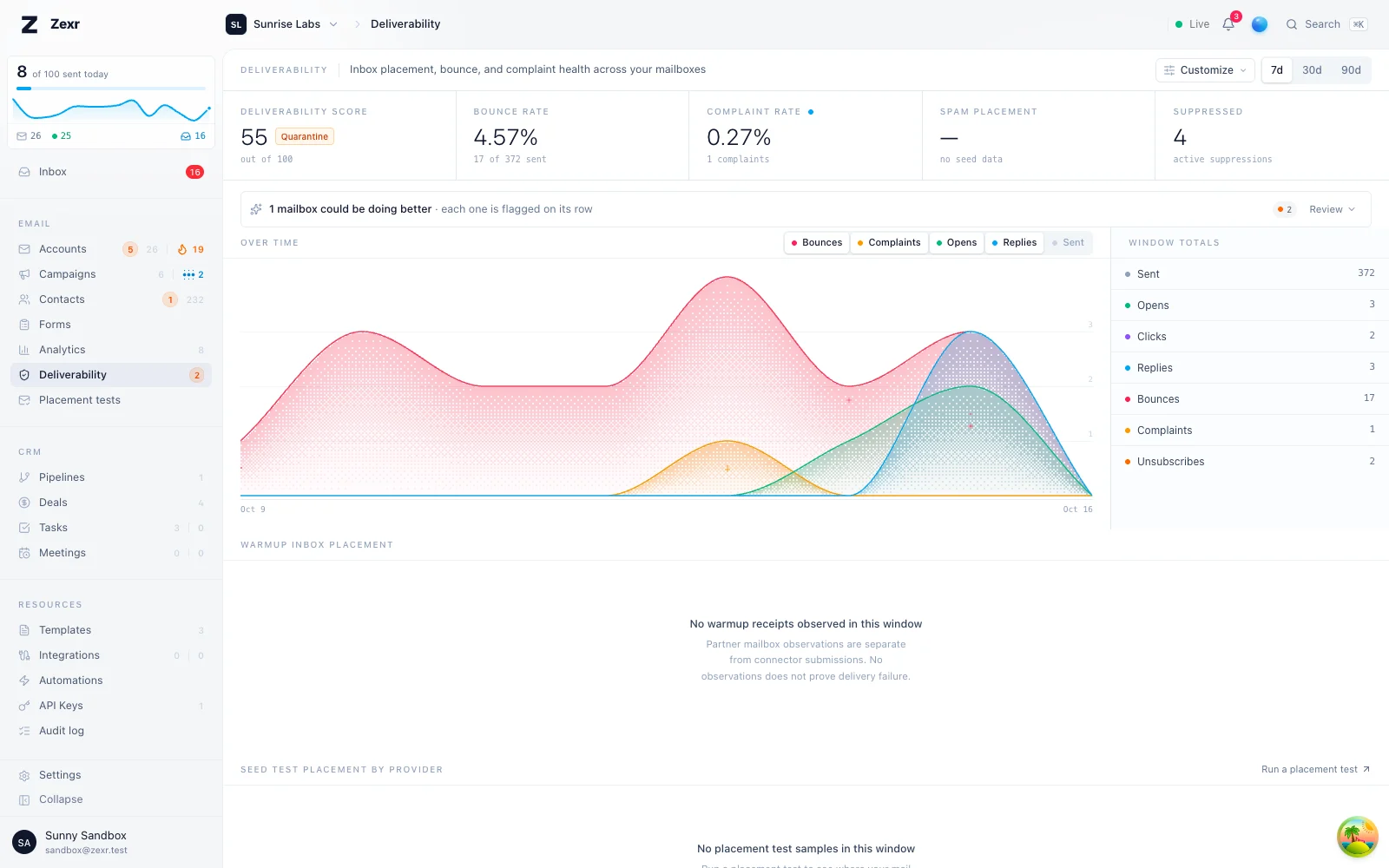
Read the dashboard
Pick a window with the 7d, 30d or 90d range tabs.
Start with the headline rates: bounce at 5% and complaints at 0.1% are the highlighted danger lines.
If a rate looks off, switch the chart to that metric and find the day it spiked.
Read the at-risk lists to see which mailboxes and campaigns Zexr is already acting on.
Good to know
- Each mailbox sits in a health band (Healthy, Watch, Throttled, Quarantine or Blocked) that controls how Zexr treats it.
- Spam placement never goes past Throttled. It slows the mailbox down and lifts on its own.
- A complaint rate of
0.10%or a bounce rate of5%quarantines a mailbox: out of the shared paid warmup pool for7 days, with cold sending paused. - Zexr suppresses a recipient automatically on a bounce, a spam complaint, or an unsubscribe, and no campaign emails them again.
- A domain that stays Failing on SPF or DMARC past the grace period (
72 hoursby default) stops cold campaign and warmup sending. Your own replies always go out.
Browsing filters, searches and view choices are remembered in your browser tab across refreshes and navigation, separately for each user and workspace.
Deliverability is whether your mail reaches the inbox instead of bouncing, getting marked as spam, or landing in junk. Zexr tracks it per mailbox and per campaign, and acts automatically when a mailbox looks risky.
These defaults are deliberately stricter than the point where Google or Microsoft start penalizing senders, so action happens before provider enforcement hits your reputation.
Scope everything to 7d, 30d, or 90d with the range tabs. It updates live, so no refreshing.
| Section | What it shows |
|---|---|
| Headline rates | Deliverability score, bounce rate, complaint rate, spam placement, suppressed count |
| Over time | One metric per day: bounces, complaints, opens, replies, or sent. Use it to find the day something spiked |
| Window totals | Raw counts behind the rates |
| Seed inbox placement | Inbox vs spam share across your placement tests in the window, with the number of copies behind it |
| Warmup inbox placement | Where warmup mail landed each day (inbox, Gmail tabs, spam), the inbox rate over time, the split per recipient provider and each mail host inside it, and every mailbox ranked by its seven-day inbox rate |
| Seed test placement by provider | Where placement test copies landed per provider family (Gmail, Google Workspace, Outlook.com, Microsoft 365, Yahoo Mail and the rest): inbox, Promotions, other Gmail tabs, spam, and copies that never arrived |
| At risk | Mailboxes and campaigns with bounce or complaint activity, worst first |
The score is a 0-100 composite starting at 100: bounce rate subtracts up to 40 points (maxed at 10%), complaint rate up to 30 (maxed at 0.30%), spam placement up to 40 (maxed at 40%). Bounce rate is highlighted at 5%, complaint rate at 0.1%.
Use Customize to pick which sections show. Your choices and time window persist per browser.
Placement needs a sample
Seed placement figures only appear once a placement test has results in the window, and a small sample is a hint rather than a verdict. Zexr waits for a meaningful sample before acting.
Inspect seed placement by provider before scaling a campaign. An aggregate can hide differences between Gmail and Outlook.com. Those differences warrant investigation, but do not establish a cause. Historical fractional rates include copies not observed by the timeout in their denominator; a timeout does not prove refusal, deferral, or non-arrival. Run a test from Placement tests, or let a campaign's monitor run one on a schedule; see inbox placement tests for how copies are sent, found and classified, and how to read one test against several.
Warmup placement is a controlled observation. Seed tests and partner mailboxes measure those test recipients, not real-customer inbox probability. Connector acceptance records a submission, not receipt or inbox placement. Click a mailbox in Warmup inbox placement to inspect its history.
Observation scope and missingness
New receipts preserve the first recorded folder before later actions. Inbox and spam require explicit folder or spam evidence. Empty and unclassified folders remain unknown; archive and custom folders are shown separately and are not counted as inbox. A copy not observed by timeout can be delayed or unreported; it is not proof of a bounce. A late seed observation is recorded separately without rewriting the timeout verdict.
Warmup's non-spam share includes inbox and category tabs among classified receipts. Seed tests retain the historical delivered field and fractional rates, whose denominator includes timeouts. Additive observed_receipts, classified_receipts, unresolved, and metric metadata expose the different evidence bases. Missing rates are null, not zero. Historical classification counts remain intact and are labelled uninstrumented; upgrades do not manufacture first folders or authentication passes for earlier messages.
Metric metadata specifies the population, numerator, denominator, missingness, unit, source, and classification policy. Warmup reports include their date range; the headline rate uses a seven-day window. The optional 95% Wilson interval assumes independent observations. Repeated mailboxes, seeds, routes, and timing violate that assumption, so this interval is not an efficacy claim or calibrated real-recipient inbox probability.
Google, Microsoft, and Yahoo family totals are not interchangeable with their consumer and business services. Inspect the host-level breakdown when Gmail versus Google Workspace or Outlook.com versus Microsoft 365 matters. Hosts that cannot be distinguished remain unknown. Pool placement, organic recipient activity, opens, bounces, and complaints stay separate. A rescue request is an action attempt, not confirmed movement or proof that reputation recovered.
Each mailbox sits in a band, shown as a colored chip. The band controls how Zexr treats it. Watch and throttled are amber warnings on Emails, not red errors, unless a separate account problem is present. They do not apply a flat health-score deduction on top of the inbox-rate cap. Mailbox health is a score out of 100, not an inbox percentage.
| Band | Spam placement | Complaint rate | Bounce rate | Other triggers |
|---|---|---|---|---|
| Watch | >= 10% | >= 0.03% | n/a | n/a |
| Throttled | >= 20% | n/a | n/a | n/a |
| Quarantine | n/a | >= 0.10% | >= 5% | Repeated tampering with received warmup mail |
| Blocked | n/a | >= 0.30% | >= 10% | Clear abuse signals (four or more deletions or spam moves of received warmup mail in 7 days) |
A mailbox enters a band by crossing any single threshold. What each band does:
- Healthy: sending normally, nothing to do.
- Watch: warmup volume lowered and spacing increased. Cold volume is dampened by the same factor, so it slows across both before anything stricter. Lifts once spam placement is back below
7.5%. - Throttled: warmup keeps running at half volume with double spacing, because warming is how placement recovers, and cold volume is halved. Steps down to watch once spam placement is back below
15%, then returns to healthy below7.5%. Separate early-signal ramp limits still apply to fresh spam landings. - Quarantine: out of the shared paid warmup pool for
7 days, as neither sender nor recipient. Cold sending is paused. - Blocked: out of the shared pool for
30 days.
Spam placement never goes past throttled. It is a reading of reputation, and warming is how a mailbox recovers, so it slows the mailbox down and lifts on its own; there is nothing to appeal.
Placement decisions and the headline inbox rate use the same seven UTC dates: today and the preceding six days. This date boundary does not shorten the rolling complaint or tampering windows.
Sample floors stop one bad event flipping a new mailbox: spam placement needs 20+ verified warmup deliveries in 7 days, complaints need 100+ delivered emails in 30 days.
Spam placement is judged at Google, Microsoft and Yahoo only. Other mail hosts run their own filters, so their spam folders are shown and never held against a mailbox; see how spam placement is judged.
Different metrics, different failure modes
Zexr never acts on the composite score alone. Complaint rate, spam placement, and bounce rate are tracked separately because they fail for different reasons, so any one can move a mailbox even while the score still looks fine.
Re-entry after a block
Time elapsing is not enough. A blocked mailbox must requalify: SPF, DKIM, and DMARC still healthy; no recent complaints or hard-bounce spikes; no recent tampering with received warmup mail; spam placement back under 10% on a fresh probation sample. Re-entry then starts low, around 5-10/day of warmup.
SPF, DKIM, and DMARC requirements depend on the provider and sending context. Zexr checks DNS records about once a day and on demand from the mailbox. This is record discovery, not actual-route alignment.
- Passing: SPF and DMARC both present, the two records readable authoritatively from DNS.
- Failing: SPF or DMARC missing.
- Unknown: not checked yet, or the lookup could not complete. A DNS hiccup never looks like a misconfiguration.
A record is only reported missing once the domain's own nameservers agree. When the instance's resolver does not return SPF or DMARC, the check asks the nameservers the domain delegates to directly, and their answer stands. That covers a resolver still caching a "no such record" from before you published it, one that drops TXT answers, and one that fails: none of them can mark a correctly configured domain as Failing. Lookups use the domain's fully qualified name, so a failure is never retried under the host's search domains and turned into a "not found".
DKIM is reported separately as Found or Not verified, never as missing. A DKIM key lives at a selector its owner chose, and DNS has no way to list the selectors under a domain, so nothing answering proves nothing. The check does better than guessing blindly: it reads the domain's own SPF and MX records, which name the provider handling its mail, and probes the selectors that provider publishes, on top of a default set covering the common ones. Providers that mint a random per-account selector, Amazon SES's own Easy DKIM among them, stay unverifiable by design. Services built on SES that publish a fixed selector, such as AgentMail's agentmail, are probed for any domain whose records name SES.
So DNS discovery can be Passing with DKIM unverified. Missing selector discovery does not prevent sending. Confirm signing in your provider's console and inspect the receiving provider's own trusted message-authentication diagnostics. A copied header or arbitrary Authentication-Results value is not proof of authentication.
The readiness explanation lists DNS discovery, receiver authentication, delivery TLS, and eligible bulk-mail one-click unsubscribe separately. Retrieved message headers provide bounded diagnostic claims for visible From, envelope domain, and signing domain/selector when available, with source and observation time. They are unverified claims: actual SPF/DKIM/DMARC verdicts, alignment, and TLS remain unknown without a trusted receiving-boundary evaluation. Unknown message evidence does not add a new sending prerequisite for existing mailboxes.
A DMARC record on the parent domain covers its subdomains, so a dedicated sending subdomain like mail.yourdomain.com passes on the record published at yourdomain.com. Where the parent sets sp=, that is the policy shown, because sp= is what the parent publishes for its subdomains. SPF works the other way: it never inherits, so every sending subdomain needs its own SPF record.
SPF is evaluated against the envelope sender (the MAIL FROM, or Return-Path), not the visible From address. Some providers put that on a subdomain of yours: Amazon SES, and services built on it such as AgentMail, use a custom MAIL FROM domain like mail.yourdomain.com that carries v=spf1 include:amazonses.com -all and an MX pointing at SES's feedback host. Under DMARC's default relaxed alignment that SPF pass aligns with yourdomain.com, so the domain needs no SPF at its root. When the root has no SPF and its MX or SPF names Amazon SES, the check looks for that subdomain under the labels SES setups commonly use (mail, bounce, bounces, mailfrom, ses, send, email, return) and counts SPF as present when one carries both the SES include and the SES feedback MX. The mailbox drawer then shows the record with the subdomain it was found on. A DMARC record with aspf=s (strict alignment) never aligns a subdomain, so there the root still needs its own SPF.
Only the two records that DNS can answer for decide the state. A DMARC policy of p=none is Passing, because Google's bulk sender rules ask for a DMARC record at p=none or stronger, and stopping mail from a compliant sender would help nobody.
What a Failing domain stops
A domain that stays Failing past the grace period stops cold campaign sending and warmup sending from every mailbox on it. The mailbox stays connected, keeps syncing, and keeps receiving warmup mail, so it holds its place in the pool and its inbound capacity. It just stops adding unauthenticated volume to a reputation everyone in the pool shares.
The grace period is set per instance and defaults to 72 hours, measured from the moment the check first saw the failure, not from when you connected the mailbox. Nothing stops the day a record breaks. You are notified when the clock starts, the mailbox drawer shows the state, and the Advisor card counts down to the date sending stops.
Your own replies are never blocked
The gate covers cold campaigns and warmup only. Manual sends and replies from the unibox always go out, whatever the domain state, because stopping a human mid-conversation is worse than the reputation risk of one message. The mailbox picker still ranks an unauthenticated mailbox last and labels it.
Getting sending back
Add the missing records at your registrar, then open the mailbox and press Check (or Re-check) under Domain authentication. For anyone who can manage mailboxes, that records the new verdict immediately and sending resumes on the next scheduled send. A teammate without that permission sees the live result, and the banner tells them when the records already check out. Waiting for the background check works too, it is just slower: it reaches each domain about once a day.
Re-check is also worth pressing after reconnecting a mailbox that was disconnected while Failing, since its stored state is refreshed from scratch when it comes back.
If a campaign has already been paused because every one of its mailboxes was gated, the activity log says so, and you restart the campaign yourself once the domain reads Passing.
An opt-out in every email. Each campaign email ends with a way to stop hearing from you: by default a plain "just reply and let me know" sentence, whose replies are detected and honoured automatically, or an unsubscribe link. Eligible marketing/bulk messages can attach one-click unsubscribe headers. RFC 8058 requires an HTTPS URI, List-Unsubscribe-Post: List-Unsubscribe=One-Click, and a valid DKIM signature covering both headers. The endpoint must process the POST without cookies, authorization context, or a redirect. Header presence and claimed signing coverage alone do not establish compliance; the delivered signature and endpoint must be checked. This requirement does not turn an ordinary personal reply into bulk marketing mail. See unsubscribe and suppression.
Pre-send verification checks every address before a campaign sends to it and skips the undeliverable ones, keeping bad addresses from becoming the hard bounces that drive the 5% and 10% thresholds above. There is nothing to run: new contacts are checked in the background within a minute of being added, each contact carries its verdict (a small mark next to the email), and Settings > Sending shows the whole workspace at a glance. See address verification below for how verdicts are produced and what to do when one is wrong.
Suppression is the safety net: a suppressed recipient is never emailed again by any campaign. Zexr suppresses automatically on a bounce, a spam complaint, or an unsubscribe, because once someone has bounced or complained the safest response is to stop, not to keep collecting negative signals. When the operator has configured TypeSafe (TYPESAFE_API_KEY), a bounce whose reason does not name the recipient is classified first, and the bounce reason text is sent to TypeSafe for this. A reputation or policy block, a full mailbox, or a temporary failure at 80% confidence or more still records the bounce, and still counts toward the campaign breaker and mailbox health, but does not suppress the address and does not drop the lead from its campaign, because the address is not what failed. The list, with anything you add by hand (addresses or whole domains), is under Contacts > Suppression list.
The list is held per workspace, and the check runs against the sending campaign's workspace before every send. If a campaign somehow has no workspace, that check cannot be applied, so the campaign is paused with the reason in its activity feed instead of sending unchecked.
Bounces are detected from the delivery-status report the recipient's server sends back. That includes the internationalized form (RFC 6533, message/global-delivery-status) that servers such as Postfix write for mail with non-ASCII addresses or headers. Only permanent failures (5.x.x, such as a nonexistent address) record a bounce and suppress; temporary ones (4.x.x, such as a full mailbox or greylisting) never do. This works the same for Gmail and Microsoft Graph mailboxes, where the send reports success and the bounce arrives later. Some failure notices carry no status code at all, such as Gmail's notice when a Google Group refuses a post. Those are read from the failed-recipient header the notice carries, and count as permanent unless the notice says delivery is still being retried.
Spam complaints arrive the same way. When a recipient presses "mark as spam", their provider mails an abuse report back to the sending mailbox. Zexr reads those reports, resolves them to the campaign send they name, and records a complaint: the recipient is suppressed and the number reaches your complaint rate. Providers that redact who complained still identify the message, so the right lead is suppressed anyway. Only genuine abuse reports count. A "not spam" report, where someone rescued your email from junk, is not recorded as a complaint. Who gets suppressed is always taken from the send the report names, never from an address written in the report, so a forged report cannot reach a contact that send never went to.
Not yet on Microsoft Graph
Complaint reports are read from IMAP and Gmail mailboxes. Microsoft Graph returns a single rendered message body without the report's machine-readable parts, so reports arriving in a Graph-connected mailbox are not detected yet. Bounce handling is unaffected.
Domain authentication refusals are separated from ordinary failures. When a receiving server refuses a message because your sending domain failed its checks (Microsoft's 5.7.515, Gmail's 5.7.26), that is not a bad recipient and not an outage: every send from that domain fails the same way until its DNS is fixed. Zexr says so in the campaign's activity feed rather than blaming the address, does not suppress the recipient, and brings that domain's authentication check forward so the domain authentication state reflects it.
Every address gets one of four verdicts. Deliverable and unverified are always sent to. Undeliverable is never sent to. Risky (a catch-all domain, a shared inbox such as info@) is sent to only when the campaign's send to risky addresses setting allows it.
Verdicts come from the following sources, and the source is shown on the contact:
- The built-in check, included on every plan: syntax, the domain's mail server, known disposable domains, and a mailbox probe against the recipient's server. It only records an address as undeliverable when that server rejects the address itself; a server that rejects the check for its own reasons (a policy block, a rate limit, a greeting it does not accept) leaves the address unverified. Microsoft 365 and Yahoo answer every probe the same way, so their addresses stay unverified rather than being called deliverable. The check also watches itself: when it starts rejecting an unusual share of addresses, its rejections are filed as unverified for an hour instead of being trusted, because a real list is never mostly dead.
- MillionVerifier: connect it once under Integrations with your own API key, and every check from then on uses your MillionVerifier credits (one per address) instead of the built-in probe. Pay-as-you-go credits and a subscription's renewing allowance both count. Its verdicts cover the catch-all and Microsoft cases the probe cannot. When the balance runs out or the key stops working, the connection is marked and the built-in check takes over until it is fixed. Nothing else changes.
- CleanMyList: connect a workspace API key under Integrations to verify new contacts and re-check existing ones through your CleanMyList account. Checks use plan allowance first, then credits. The built-in check takes over when verification fails. The balance stays in CleanMyList because its API does not expose it. See setup instructions.
- Truelist: connect a workspace API key under Integrations, and every check uses one Truelist credit per address. Catch-all, role and disposable addresses are flagged. The built-in check takes over when verification fails, and the balance stays in Truelist. See setup instructions.
A workspace uses one of these at a time. Connecting a second service is refused until the first is disconnected, so a check never moves to a different bill on its own.
- Results you already have. A list verified with another service (ZeroBounce, MillionVerifier, CleanMyList, Truelist, NeverBounce, Bouncer, Kickbox, Emailable, DeBounce, Clearout, EmailListVerify, or a Zexr export) can bring its status column along. The import recognises the column from its header or its values, maps it to Verification status, and reads each service's own words (
catch-all,do_not_mail,ok_for_all, and so on). Those verdicts are kept as they are; the built-in check leaves them alone. The same field is accepted when creating contacts through the API.
What real mail teaches the check
A check sees an address once. The platform sees what happens after every send, and that evidence outranks any check:
- Proof the mailbox is live: a reply (an automatic one too, since a machine answered from it), a click, an open by a person (mail-client prefetches do not count), and a delivery the recipient's server kept without bouncing for three days. A reply, a click, a human open, or two clean deliveries make an address deliverable whatever a probe said about it.
- Proof it is not: a bounce whose text names the recipient (
5.1.1, "user unknown"). A full mailbox, a policy block, or a reputation rejection says nothing about the address and is recorded as such. - Nothing at all: a contact who never opens or replies. Silence is not evidence; there is no input for it and nothing in the ledger can say "did not open". A lead that ignored one campaign is exactly as deliverable as it was.
Every contact carries a confidence (0 to 100) next to its verdict, and the contact drawer's Deliverability card lists the reasons in plain words with the observations behind them. Newer evidence outranks older: a bounce after a reply makes the address undeliverable, a reply after a bounce makes it deliverable again, and old observations fade over months rather than switching off.
A paid verifier's answer is newer evidence too. When MillionVerifier, CleanMyList or Truelist says an address is deliverable or undeliverable more than 30 days after the last real mail to it, its answer stands, because mailboxes get closed and a fresh check about one outranks a stale sign of life. Inside those 30 days, real mail still wins. The built-in probe never outranks real mail.
Verdicts age: an address is checked again after 90 days (30 for an inconclusive verdict), because mailboxes get created and closed, but one that real mail reached in the last six months is left alone. A verdict a teammate set by hand never expires and is never outvoted by evidence.
When verification is wrong
Open a contact and press Re-verify on its Deliverability card, or select several and choose Verify in the selection bar: Re-verify queues a fresh check through the verifier the workspace uses, and Mark deliverable overrides the verdict for a list you know is good. Both are also available on a campaign's Leads tab.
A re-verify runs ahead of every other check, whatever the contact's history: a recent verdict, recent mail, or a verdict a teammate set by hand. The current verdict stays in force until the new one lands, so campaigns keep routing on it meanwhile, and the card shows Re-verifying with MillionVerifier until the result appears on its own. If the connected verifier cannot be used at that moment (no credits left, a rejected key), the toast and the card say so and the built-in check runs instead.
The Deliverability card always says who produced the verdict and when: Verified with MillionVerifier, Checked by Zexr's built-in check, Imported from ZeroBounce, or Marked by a teammate. When real mail decided otherwise, it also says what the check itself answered.
A campaign never quietly finishes because of verification. When every remaining lead has been refused, the campaign shows needs verification and pauses, with two buttons on it: Re-verify leads checks them again and resumes sending automatically as soon as any pass, and Send anyway marks them deliverable and resumes at once. The launch check likewise offers Launch anyway when a list is refused for its projected bounce rate, for a list verified elsewhere.
Recipient rules
Some addresses are deliverable and still not worth a cold email. Settings > Sending > Recipient rules holds two workspace rules that every campaign applies on top of verification.
Skip help-desk inboxes. Off by default. When on, an address whose name before the @ is on the help-desk list is never sent, in any campaign, for as long as the rule is on. The default list is support, help, helpdesk, info, sales, partnership, partnerships, growth, marketing, feedback, care and service. A name matches the whole part before the @, ignoring case and any +tag: support matches support@, Support@ and support+tickets@, but not support.eu@, supporter@ or info.smith@. These addresses are also left out of background verification, so they never use a verification credit. Pressing Re-verify on one still checks it, because you asked.
Role addresses. Verification flags shared inboxes as role accounts and files them as risky. By default every role address is sent, as long as the campaign's send to risky addresses setting allows risky ones. Choose Only founder inboxes to send only to the role addresses on the founder list (hello, hi, hey, team, contact, founder, founders and ceo by default, matched the same way). Any other address verification called a role account is skipped. With send to risky addresses off, every risky address is skipped whatever this rule says.
Match names with a suffix widens both lists: a name followed by . or - matches too, so support also catches support.eu@ and support-team@. It is off by default because it catches people as well: info would match info.smith@ and sales would match sales-jane@.
Both lists are editable, up to 100 names each, using letters, digits, ., _ and -. Reset to defaults puts a list back. A change applies to every campaign from its next send, and switching a rule off puts its leads straight back into routing.
A lead a rule skips shows as Undeliverable in the campaign's leads, the same as one verification refused. Unlike a refusal, it never pauses the campaign to ask for re-verification: re-checking cannot change a rule, so a campaign whose remaining leads are all skipped by rules completes. When the campaign completes, or a continuous one runs out of leads, its activity feed says how many leads the rules skipped and which rule skipped them, so a campaign never finishes having quietly skipped its list. If a rule changes between a lead being picked and its email going out, the send is refused and the feed records Help-desk inbox skipped or Role address skipped.
Rules belong to the workspace and travel with a workspace export. Through the API they are read and replaced with GET and PUT /v1/outreach/recipient-rules.
Individual protections each watch one thing: a rate limit watches one user, warmup health watches one mailbox, verification watches one address. A workspace that is slightly wrong on several of those at once sits under every individual threshold and is never noticed. The workspace posture is the view that sees all of them together.
| Posture | What it means | What changes |
|---|---|---|
trusted | The default | Nothing |
watch | Enough signal to keep an eye on | Nothing you can feel. It exists so evidence builds before anything is taken away |
restricted | Evidence of what the workspace sent, not only how it looks | Daily volume per mailbox drops to a quarter, and warmup moves to the shared free pool |
suspended | Serious or confirmed abuse | Sending stops, pending review |
When a workspace is restricted or suspended, a banner across the top of the dashboard says so and why. Nothing is ever taken away silently.
Signals come in two kinds, and only one of them can cost you volume.
How a workspace looks is evidence, not a verdict. Several workspaces opened from one office address, one person opening all of them, or a batch of mailboxes connected in an afternoon are exactly what an agency onboarding clients looks like, so on their own these can only reach watch. They are recorded, they show up in review, and they change nothing you can feel.
What a workspace does to recipients is what a posture acts on: an import that is mostly unusable addresses, a bounce rate at or above 5%, or a complaint rate at or above 0.1%. Rates are measured over at least 100 sends in the last 30 days, because below that a percentage is noise. A rate past the point providers themselves act on, 10% bounces or 0.3% complaints, is enough to restrict a workspace on its own.
How a posture lifts
No posture is permanent, and there are three ways out of one.
The evidence stops holding. Postures are re-derived nightly, so a posture lifts on its own once the findings behind it no longer stand. A finding that is re-checked on a schedule, such as being part of a cluster of workspaces opened from one address, is withdrawn the moment it stops being true. Import quality is measured across everything a workspace has imported rather than per file, so one clean upload does not erase a bad list that is still stored, and the finding fades as good data outweighs it.
A one-off finding ages out. A detector that fires once and has nothing that would ever re-check it, such as the score of the address a workspace signed up with or a run of sign-ins from implausible places, files its finding with a 30-day expiry. After that it is retired and the score falls without anyone doing anything.
Review. A platform operator can read every finding on file, retract any one of them, and set the posture directly. A posture set by review holds against the detectors until an operator lifts it, so a workspace cleared by a human is not put back by evidence that is still on file, and a workspace an operator suspended is not released by a detector retracting.
If your workspace is restricted or suspended and you believe it is wrong, reply to the notice or contact your platform operator and ask for a review. The banner's reason is the same sentence they see.
- Start with the headline numbers. Bounce at
5%and complaints at0.1%are the highlighted danger lines. - If a rate looks off, switch the chart to that metric and find the spike day. It usually points at one campaign or one imported list.
- Check placement by provider, and the hosts inside each one, to see whether mail actually reaches inboxes.
- Read the at-risk lists. The chips show which senders Zexr is already acting on.
- Slow down anything in Watch and let it recover. Leave Quarantine and Blocked out of sending until they requalify.
The habit that matters: keep complaint rate and spam placement low. A clean reputation at modest volume beats high volume with rising complaints every time.
Related guides
Personalization & Expressions
Merge fields, conditionals, fallbacks, functions, spintax, and automation expressions: the templating language shared by campaign emails and automations.
Inbox placement tests
Send a campaign step or a template from one of your mailboxes, or from a whole fleet at once, to seed inboxes at the major providers, and see where each copy landed.